Gemini
IIT Delhi · Research Methods DDL7007 · Sruthi Murali · Shivanand Pegu · Suchalika Tarafdar
A contextual inquiry study, enhancing information organization and retrieval in Google Gemini.
We began by interviewing users about how they organize and manage conversations across different AI platforms. Participants mentioned frequent use of Gemini for various tasks, and why they prefer it for some of them over other AI tools.
They also shared valuable insights about their frustrations with chat organization and the workarounds they use to manage information. These insights revealed a clear opportunity to improve how conversations and information are organized within Gemini.
Why Gemini
-
01
We began our study by interviewing users about how they organize and manage conversations across different AI platforms.
-
02
Participants mentioned frequent use of Gemini for various tasks.
-
03
Participants also mentioned why they prefer Gemini for certain tasks over other AI tools.
-
04
Participants shared valuable insights about their frustrations with chat organization and the workarounds they use to manage information.
-
05
These insights revealed a clear opportunity to improve how conversations and information are organized within Gemini.
Data Collection
Conducted contextual inquiry with 3 students who regularly use Google Gemini for study, coding and research. Observed users while they performed tasks such as searching information, asking follow-up questions, and revisiting previous responses.
- 01
Recorded user behaviors, interaction patterns, and difficulties during long conversations with gemini.
- 02
Collected interview responses, observation notes, and screenshots of user interactions.
- 03
Asked participants about their workflows, frustrations, and workarounds when using Gemini.
Participants
The three user's we interviewed.



Interview questions
Warm-up Questions (User Background)
- What different AI platforms do you use?
- How often do you use Google Gemini?
- What kinds of tasks do you usually use it for?
Usage Workflow Questions
- Can you walk me through the last time you used Gemini?
- What task were you trying to complete?
- Do you usually start a new chat or continue in the same chat?
- What do you do with the information that Gemini provides?
Organization & Retrieval Questions
- Have you ever tried to find an answer that Gemini gave earlier?
- How easy or difficult is it to locate old responses?
- Do you usually start a new chat or continue in the same chat?
- Have you ever lost an answer that you wanted to reuse?
Workarounds
- Do you copy useful responses somewhere else?
- Where do you usually store them?
- Do you organize responses from Gemini in any way outside the app?
- If you cannot find an important old chat, what do you usually do?
Pain Points
- What frustrates you most while using Gemini?
- Have you ever felt overwhelmed by long conversations?
- Do you find it difficult to manage multiple topics within a single chat?
- Have you ever accidentally asked a completely different question in an existing chat and received confusing responses?
Closing Questions
- How important is Google Gemini for your daily work or study?
- Would you continue using it if the chats keep getting longer?
- What would make Gemini easier for you to use?
Anjana
PhD, civil engineering · A Phd student in the civil dept.
I often lose important information and find it difficult to track data in long conversations.
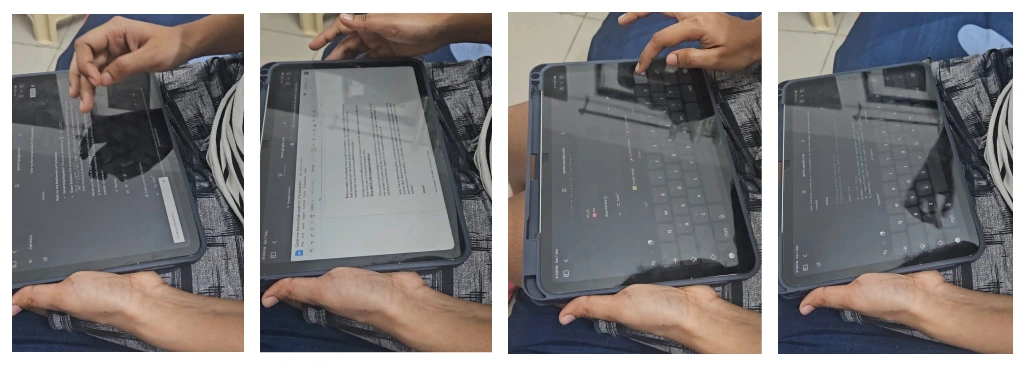
The Phd student who uses Gemini for coding, simulations and research. Anjana is a PhD scholar in the dept. of Civil Engineering specializing in fire safety management, who uses Gemini to generate codes and further takes it to MATLAB to analyze data.
Primary uses
- Converting a coding questionnaire PDF into a TXT file using Google Gemini to generate MATLAB code.
- Working on fluid dynamics coding using MATLAB, LaTeX, and Gemini together.
- Switching between Anaconda and Gemini to verify code or formulas.
- Using split-view screens to reduce constant switching between software.
Behavior
- While using Google Gemini, Anjana worked quickly and relied heavily on it for generating code for MATLAB.
- She frequently edited prompts to correct errors in the generated code.
- She also switched between files and chats when she could not find previous data.
- At times, she appeared slightly frustrated when locating old chats, files, or images because they were not clearly organized.
Pain points
- Loss of data in long chats: Important information becomes difficult to track in lengthy conversations.
- Exporting content: often move content to notes or export it as a PDF to save important data.
- Hard to find old chats: Previously done conversations are difficult to locate.
- No clear timestamps: Chats do not clearly show date, time, or month.
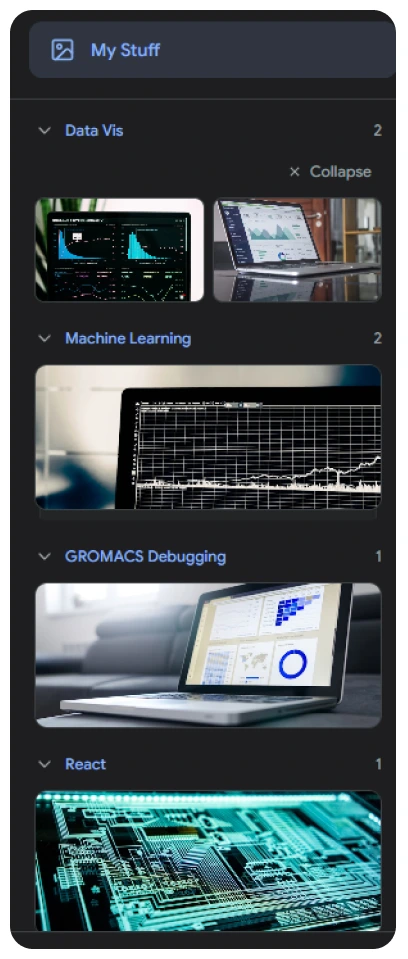
- Image clutter: All generated images appear together in "My Stuff"
Monisha
M.S.(Research), Material Science · A M.S.(Research) 1st year student
I struggle to navigate long chats in Gemini and find earlier scripts or organize coding outputs.
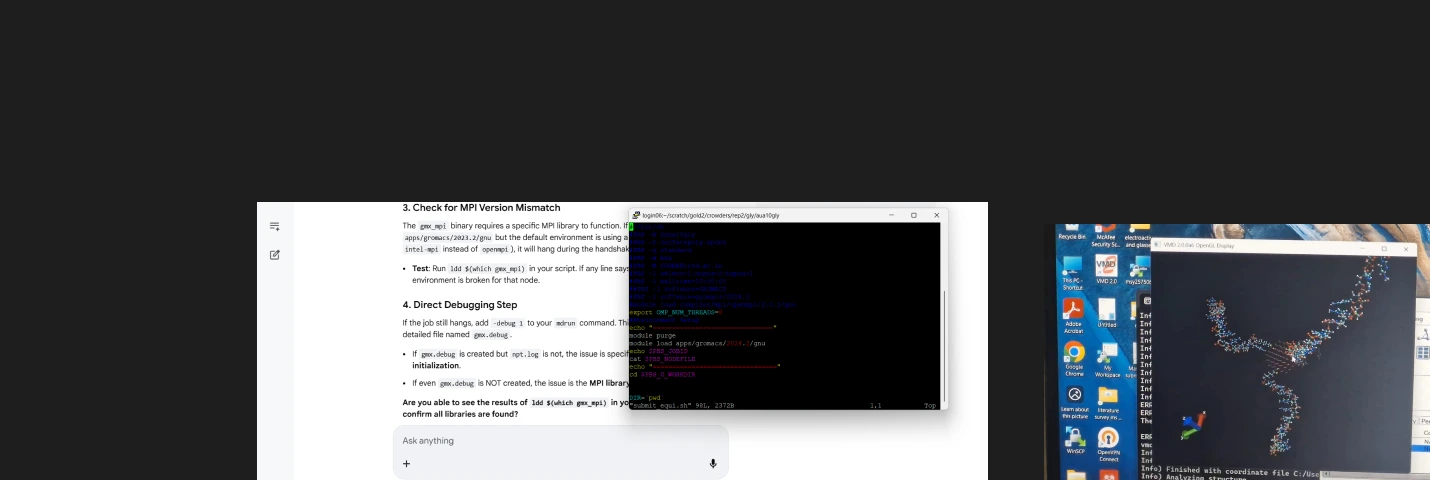
M.S.R student who uses Google Gemini to debug scripts and generate code for plotting complex graphs. Monisha's research focuses on the computational investigation of biofunctionalized nanoparticles. She studies how gold nanoparticles behave when DNA is attached under different environmental conditions. She regularly uses Google Gemini alongside HPC (High performance computing) system for coding help and troubleshooting.
Primary uses
- Debugging scripts for molecular simulations.
- Generate Practice questions for exam preparations.
- To plot complex graphs.
Behavior
- Manually renames every conversation to ensure future searchability and identification.
- Even when continuing an existing conversation, she reintroduces the context each time she resumes the chat.
- She never uses incognito mode while working.
- While doing coding related work, she often scrolls back through the conversation to revisit earlier responses or code snippets.
Pain points
- Navigation Fatigue: Long technical threads require excessive scrolling to reference earlier logic or code blocks.
- Context Loss: Starting new chats to avoid clutter forces repetitive reexplanation of the codebase and project goals.
- Manual Documentation: The lack of internal script organization necessitates manual copying and pasting to external tools like Google Docs.
B M Rimil
M.des, Department of Design · A M.des 2nd Year student
Repeating the prompt is annoying, but digging through old chats is worse.
The Design student who uses Gemini for idea elaboration and generate quick mockups. Rimil is currently working on a design project focused on disaster management. She frequently uses Gemini to perform various tasks, ranging from academic work to casual or fun activities. Earlier, she used ChatGPT more often, but nowadays she prefers Gemini because she feels ChatGPT tends to give more abstract answers, while Gemini provides more concrete and direct responses.
Primary uses
- Elaborating ideas from base concepts.
- Exploring different perspectives for her project.
- Formatting and structuring research findings.
- Generating quick visuals for design mockups.
Behaviour
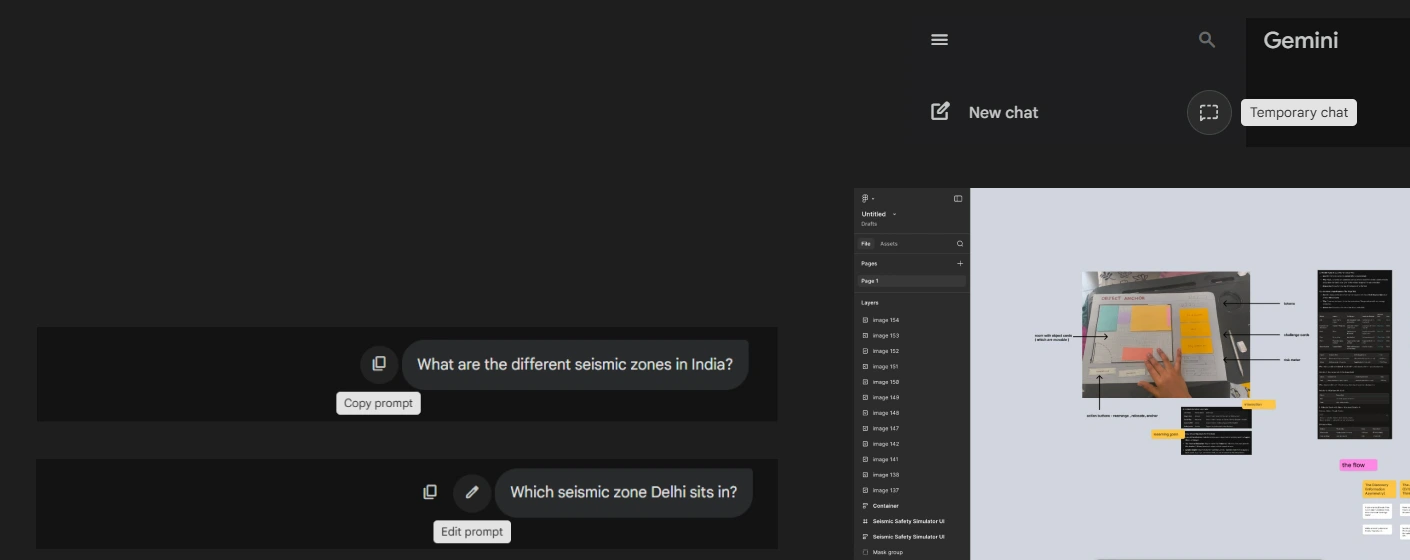
- Takes screenshots of important conversations and saves them in a FigJam file, or sends the screenshots to herself on WhatsApp, and later compiles them in FigJam.
- Never uses incognito mode, as she tends to forget. She searches both silly and important things in the same place.
- Almost never renames a chats.
- Instead of scrolling back to find ols lost chat, she prefers writing new prompt.
Pain points
- Limited prompt editing: In Gemini, users can only edit the most recent prompt and cannot modify earlier prompts in the conversation.
- Response replacement: Gemini replaces previous responses, unlike ChatGPT, where multiple responses remain accessible in one place.
- Difficulty tracking chats: often loses track of chats.
- Ineffective search: The search feature is not very effective for locating specific older conversations.
Participant Quotes
User scrolled for 40 seconds trying to find earlier response and said
I know it was somewhere above.
While scrolling again
I just want a list of the answers, not the whole conversation.
While trying to delete messages
I wish I could just select multiple messages and delete them. Doing it one by one is annoying.
While continuing a conversation in an existing chat
Repeating the prompt is annoying, but digging through old chats is worse.
While reviewing a long chat
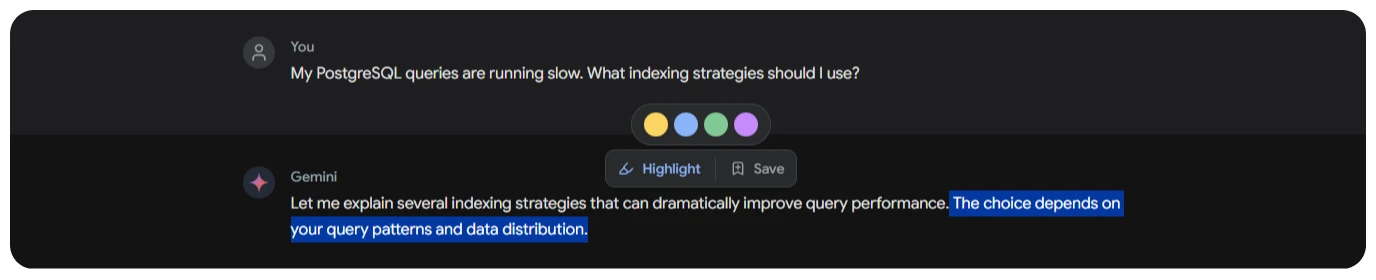
It would be nice if I could highlight important parts like in a book and come back to them later.
Existing interface of Gemini
Following the 2026 update that merged Google Assistant and Gemini, managing and sorting through chat histories has become significantly more challenging for many users.
Instructions given to Google Assistant on the phone also appear in the Google Gemini chat. For example, if I say "Ok Google" and ask it to set an alarm, that command also shows up in the Gemini chat section. This makes it even harder to separate important conversations from less important ones.
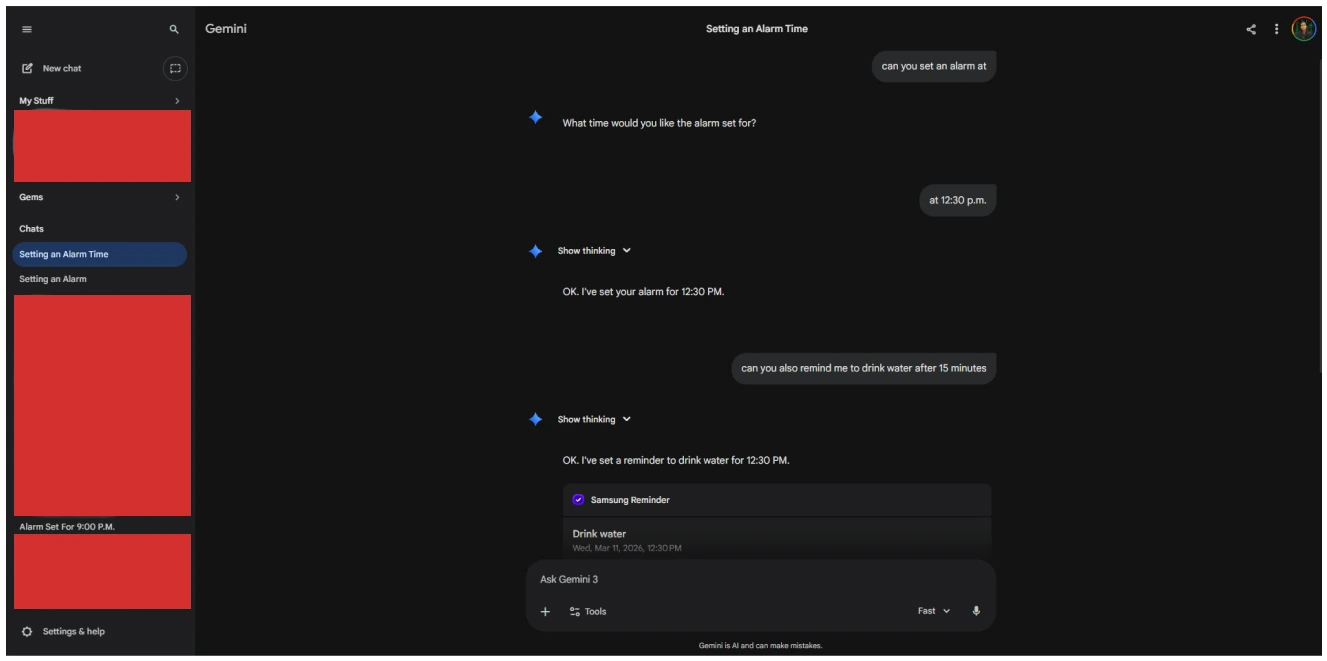
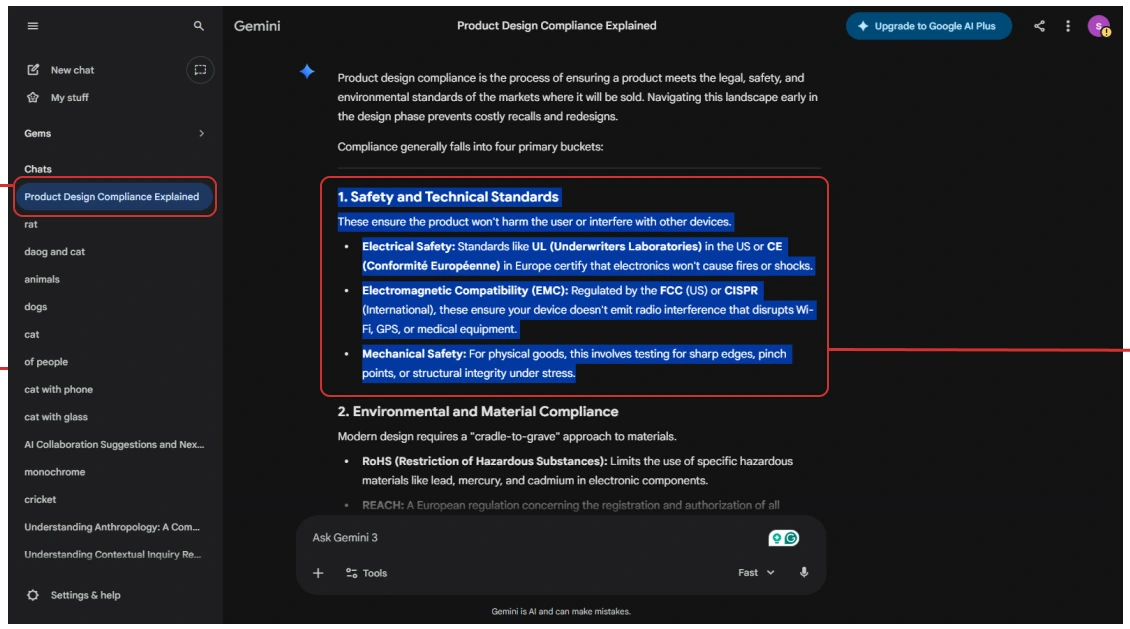
- Difficulty finding old conversations due to limited search feature.
- Limited filtering and sorting options for chat history.
- Previous responses get replaced, making comparison difficult.
- Lack of highlighting or note-taking features to save important responses.
- incognito mode is less legible.
- Images are not organized chat-wise in the "My Stuff" section.
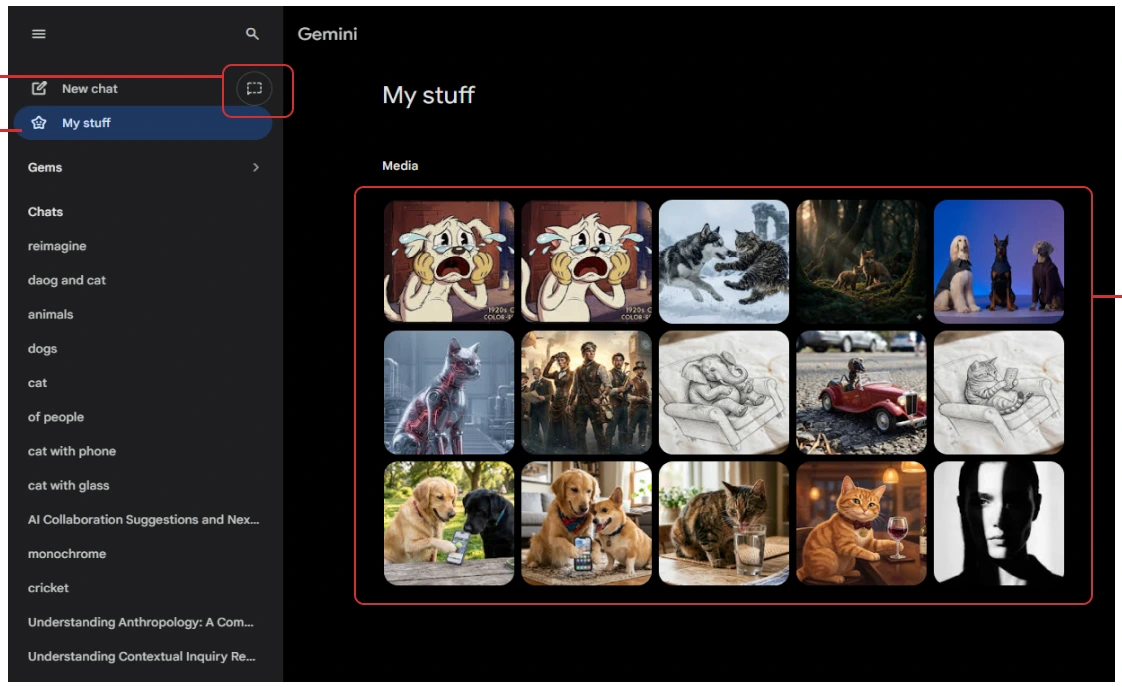
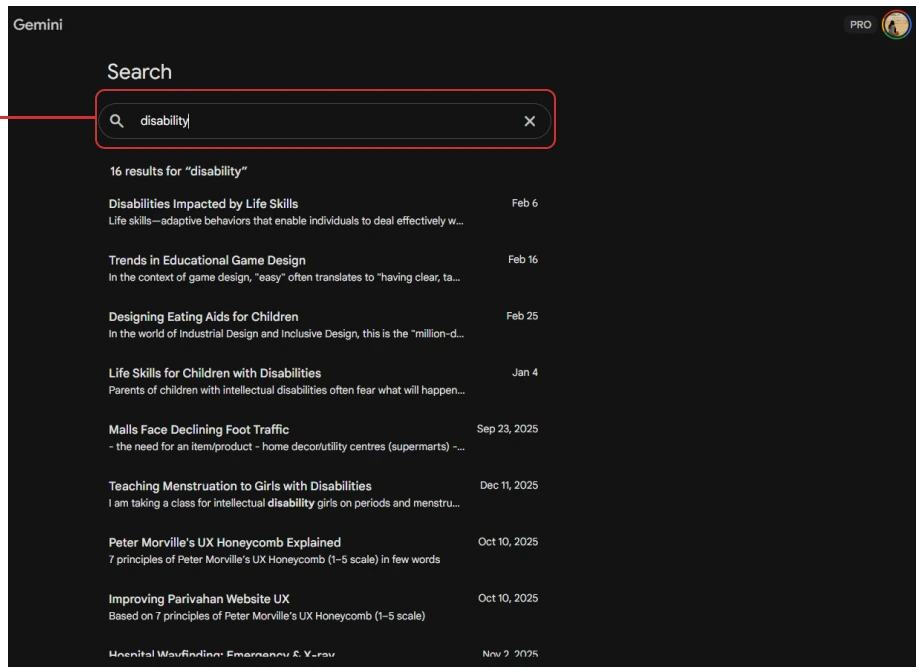
- Search does not jump to the exact message in the chat.
- When you search something with keywords it does not take you to the exact location in the chat it just opens the chat.
Interview insights
- Loss of conversational contextWhen users cannot easily locate past chats, they often start new conversations instead of continuing old ones.
- Limited Prompt EditingGemini only allows editing the most recent prompt, making it difficult to refine earlier inputs or change the conversation direction.
- Search limitationsSearch often fails to find the right conversations, especially when users remember only partial keywords, making it unreliable for retrieving past chats..
- Lack of effective sorting optionsChats are arranged only by recent activity, so users need other sorting options like date, topic, or importance/frequent use.
- Need for better grouping and organizationUsers cannot group related chats, so conversations from the same project get scattered. They suggested folders, topic-based grouping, or project-based organization.
- Difficulty Tracking Previous ResponsesGemini replaces earlier responses, making it hard to compare outputs or revisit previous answers.
- Inefficient filtering of conversationsUsers need filters like topic, time, or starred chats, but without them they must scroll through many unrelated conversations.
Design opportunities
Chat organization
Introduce folders, tags, and flexible sorting options (recent, oldest, frequently used, or priority) to group and easily navigate conversations by topic or project.
Highlight feature
Similar to the highlight system in Amazon Kindle, users could highlight important responses, with all highlights collected in one place for quick reference.
Incognito mode
A clearer and more legible incognito mode could help users conduct temporary or private queries without cluttering their main chat history.
Filtering capabilities
Filters based on topic, date, or starred/important conversations would help users quickly find relevant chats instead of scrolling through long lists.
Chat-wise image viewing
Users suggested organizing images generated or shared within each chat, instead of displaying all images together in the "My Stuff" section.
AI + notebook workspace
combination of an AI assistant and a notebook. A workspace panel could allow users to save insights, organize responses, and build notes directly while interacting with the AI.
Multiple chat selection
Selecting multiple chats at once would allow users to manage, move, or organize conversations more efficiently.
Improved search navigation
When searching with keywords, users want the system to jump directly to the exact message in the conversation rather than simply opening the entire chat.
Visible theme toggle
Provide a clear icon for switching between light and dark mode, so users can easily recognize and change the mode.
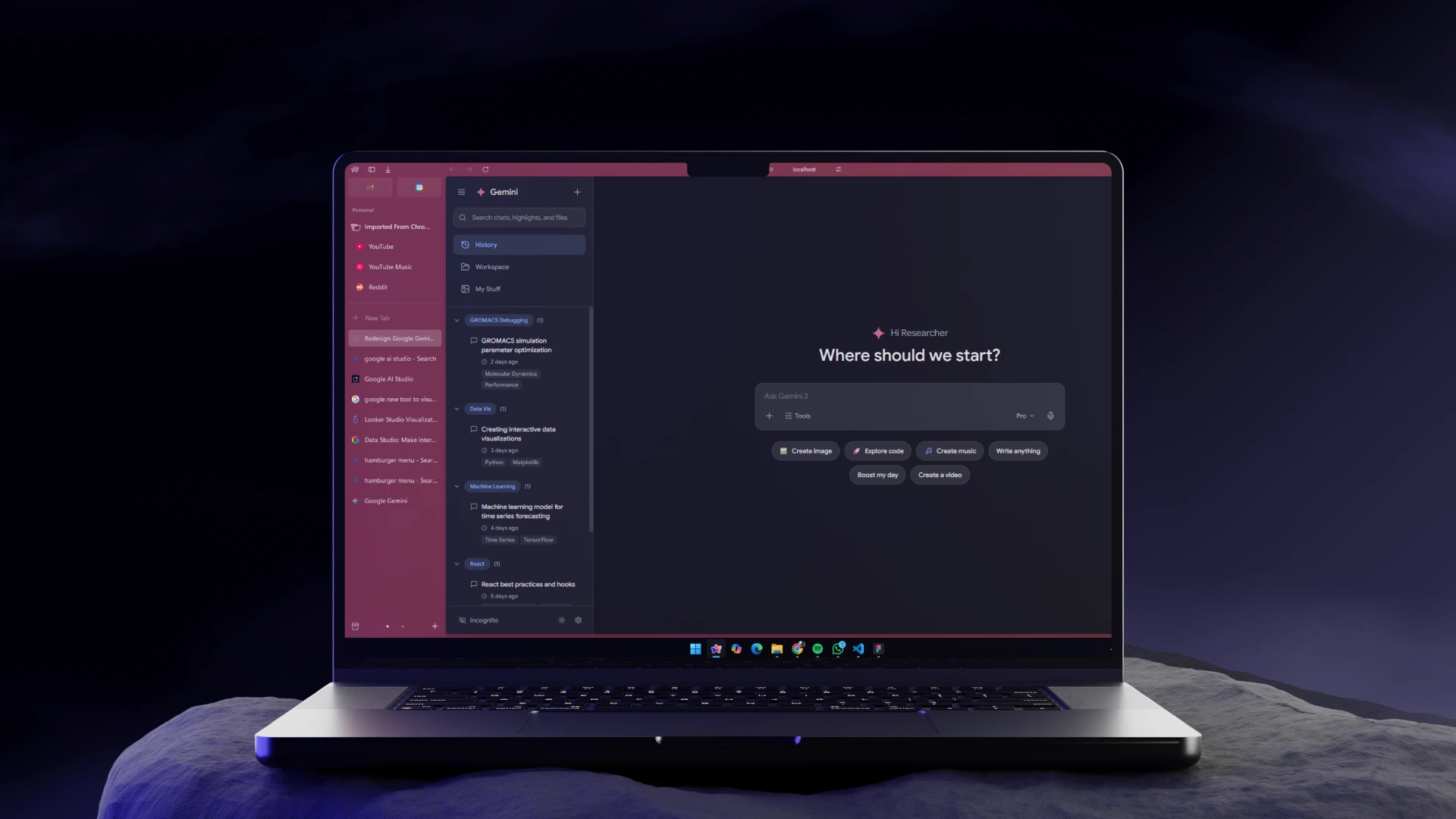
The proposed interface
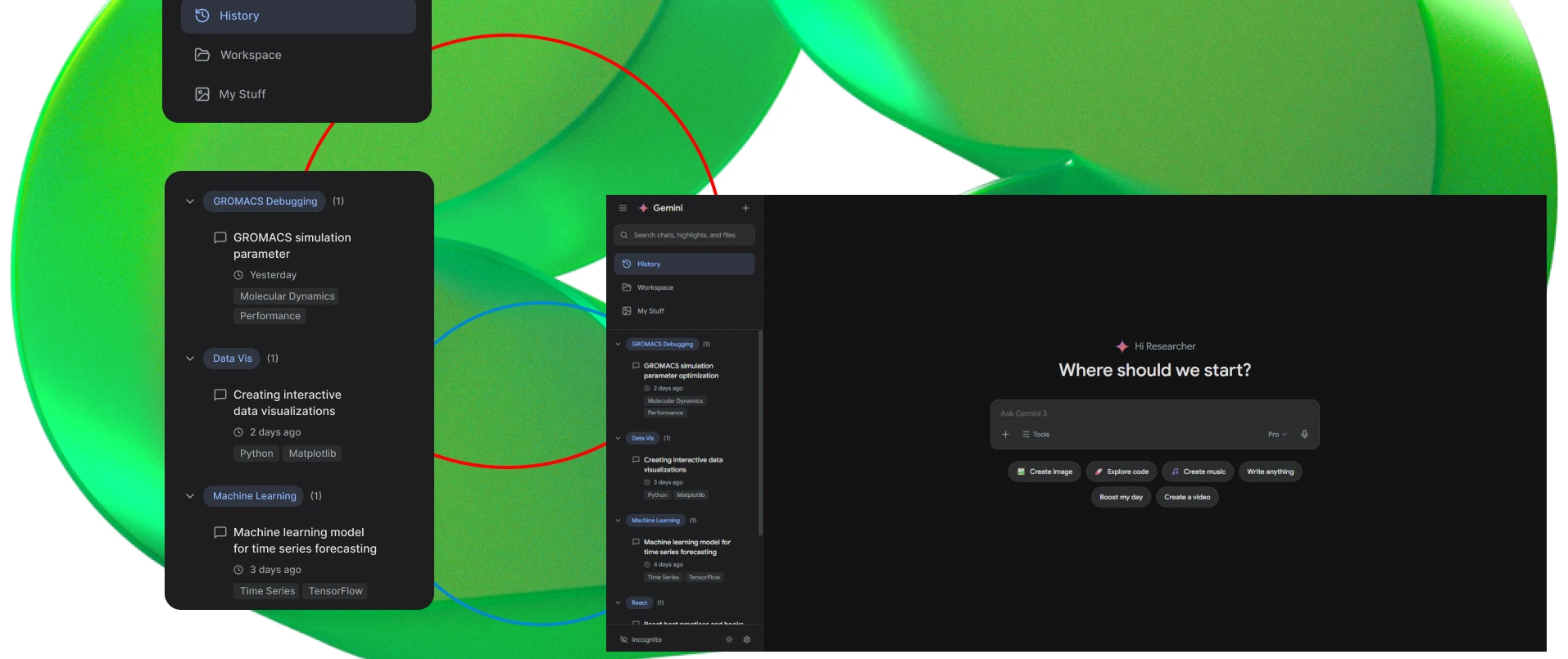
A redesign that answers the field findings directly, smart tags and auto grouping, a workspace for snippets, native highlighting, a clearer incognito state, and image viewing organized by chat.
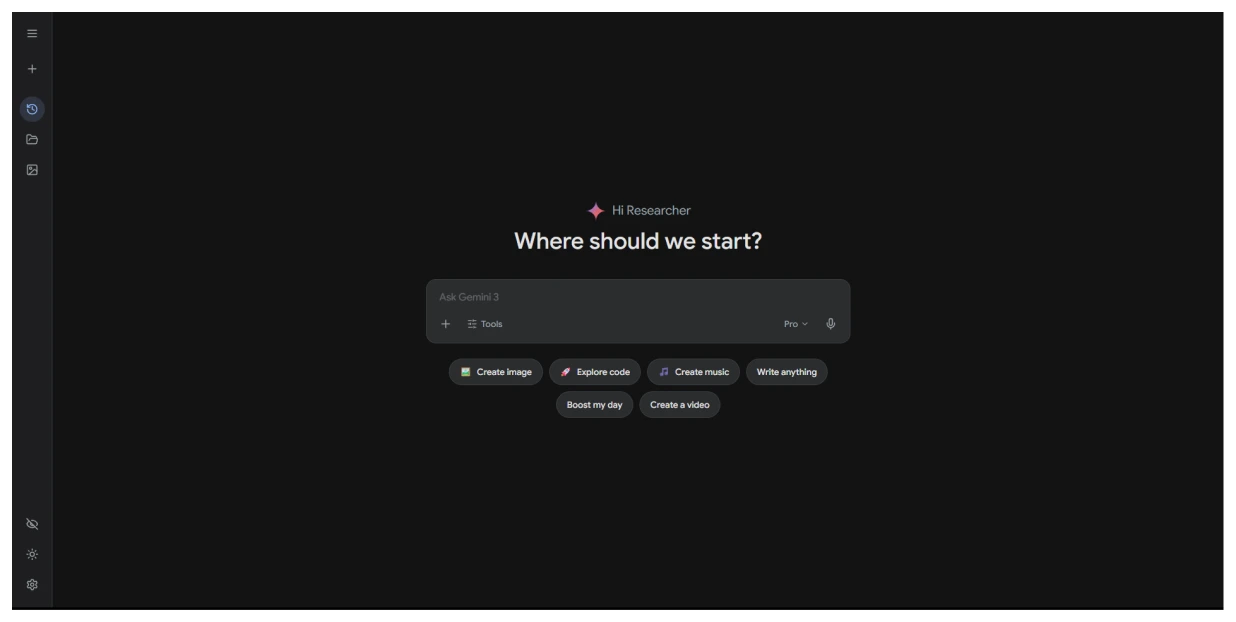
Landing Page, Collapsed Mode
A focused entry point. Chat History, Workspace, My Stuff, Light Mode, Incognito Mode and Settings sit one tap away, the rest of the canvas stays clear.
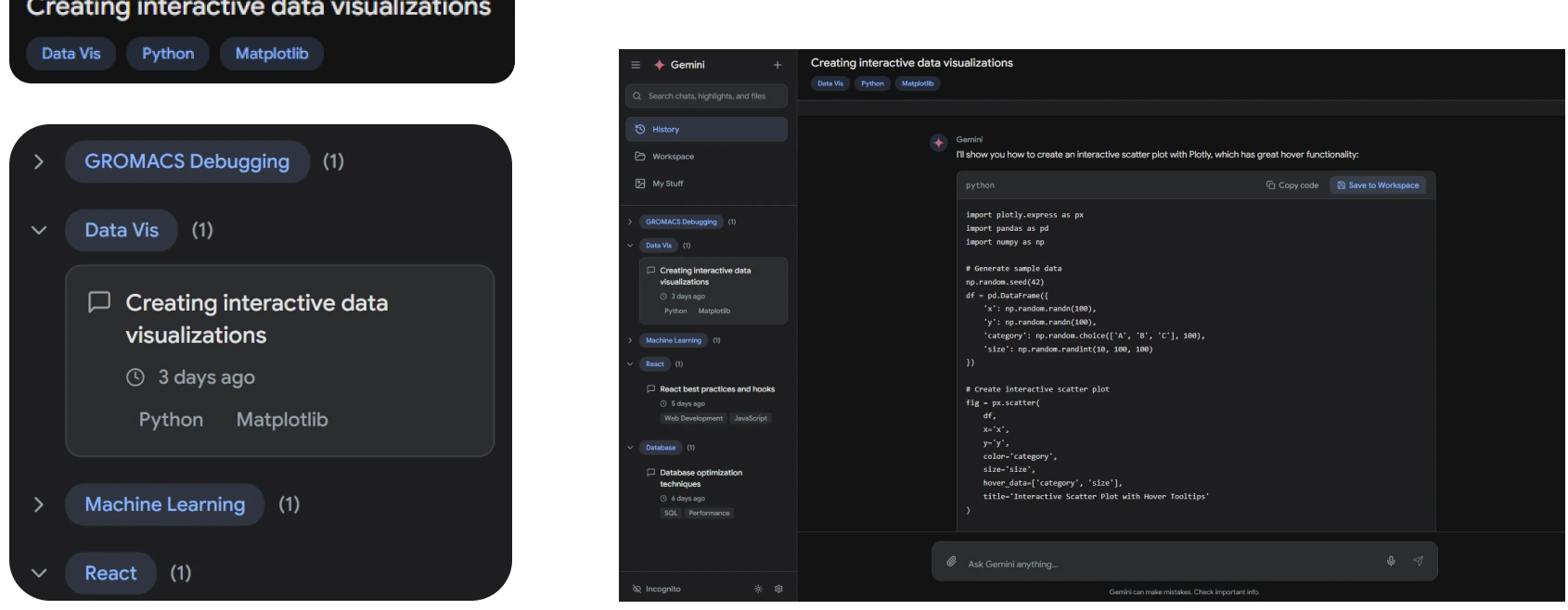
Tags and Auto Grouping/Sorting
It automatically categorizes conversations based on their core topics. It replaces a cluttered chronological list with thematic folders and keeps related research tasks naturally organized.
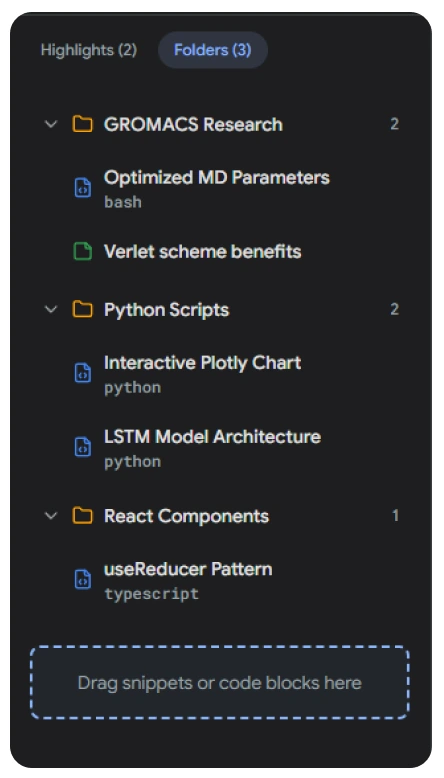
Workspace Folder Structure
Users can drag and drop specific code snippets or insights directly into these folders, building a structured knowledge base without leaving their active chat session.
Highlighting and Auto Indexing
A native selection tool that allows users to capture specific lines of text or code blocks. This completely eliminates the need to save, export, or scroll through entire conversational logs just to retain a single valuable insight.
A clearer incognito state

Expected behaviour
The seven stages below trace one research session, from looking for an earlier answer through to saving the output. Each point records how well the interface is expected to hold up at that stage. The values are projected from the three interviews rather than measured in a usability test, so the proposed line states a design intention and not a result.
- Proposed interface
- Current workflow
Prior Retrieval
"I know it was somewhere above, but finding it is impossible."
Current Workflow
Users waste significant time searching or scrolling through chronological lists, struggling to locate past discussions or references.
Proposed Interface
Automatic topic-based tags group relevant conversations instantly, making past retrieval effortless and immediate.
Future Scope
Collaborative workspaces where multiple students can add snippets to a shared project folder. Integrating exporting options directly to Notion or Google Docs.